Shorter lines
Every customer's wait, live, at every register. The front end sees a line building before it is a problem.
Know how long every customer has waited in every line, while they are still in it. LineSense times each customer from the moment they join a line until they reach the register, and when a line grows it tells your manager, on their phone, which register to open.
A small iEdge Gateway box in the store reads the cameras already over the registers, finds the people, follows each one up the line and times them zone by zone. It drives a TV over HDMI and sends the alerts itself. No sensors, no door counters, no camera settings changed.
Shoppers judge a store by how long the line looks. When you can see every wait as it happens, you open the next register before people put their basket down and leave.
Every customer's wait, live, at every register. The front end sees a line building before it is a problem.
"Register 3 is closed: open it?" A message with the camera's picture, to the manager by name, by e-mail or WhatsApp.
Reports by register, hour and weekday show when the lines grow, so the schedule puts a cashier there before the rush.
It uses the cameras already over your registers. No ceiling sensors, no door counters, no beams across the lanes.
Pick your store. Each customer is followed from the back of the line to the register, their time over them: green on goal, amber past it, red when it is too long.
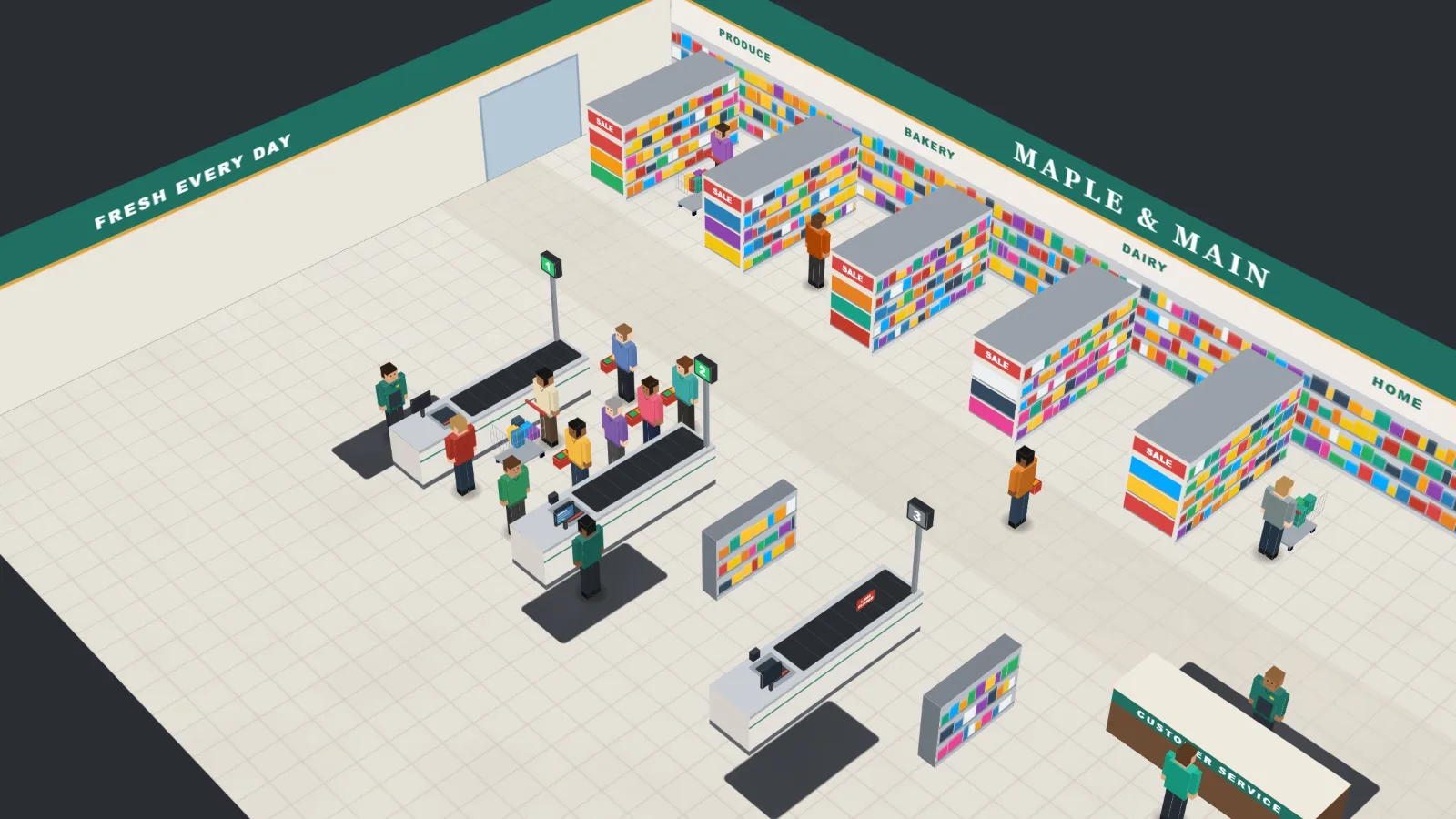
Each lane has its own line. Shoppers pick the shortest; when the lines grow the board names the busiest lane and tells the manager to open the next one. The people at the back move over, and keep their wait.
Wait goal 2:00 · too long 5:00 · alert at 3 waiting per open register
A checkout, a service desk, a pharmacy window, a food court. Pick the store type and the board starts with realistic times for it; every one of them can be changed.
| Restaurant counter | Store checkout | Convenience store | |
|---|---|---|---|
| Wait in line | 2:00 / 3:00 / 5:00 | 2:00 / 3:00 / 5:00 | 1:00 / 2:00 / 4:00 |
| At the register | 1:00 / 1:30 / 2:30 | 2:00 / 3:00 / 5:00 | 0:45 / 1:30 / 2:30 |
| Pickup | 3:00 / 4:00 / 6:00 | - | - |
| Waiting per open register | 2 / 3 / 5 | 1 / 2 / 3 | 1 / 2 / 3 |
| A long line must last | 0:45 | 0:30 | 0:30 |
Where they come from: grocers run checkout by people, not minutes (never more than one in front); shopper patience drops sharply after about four minutes in line; the convenience store norm is about 42 seconds in line and 21 to pay. No restaurant chain publishes a front counter standard, so those come from a lunch-hour study, a 4-minute hand-off target and shopper surveys.
The gateway plugs into a TV with an HDMI cable, or the board opens in any browser. Each register open or closed, everyone in line with their own wait, and the cameras with each person's time on the video.
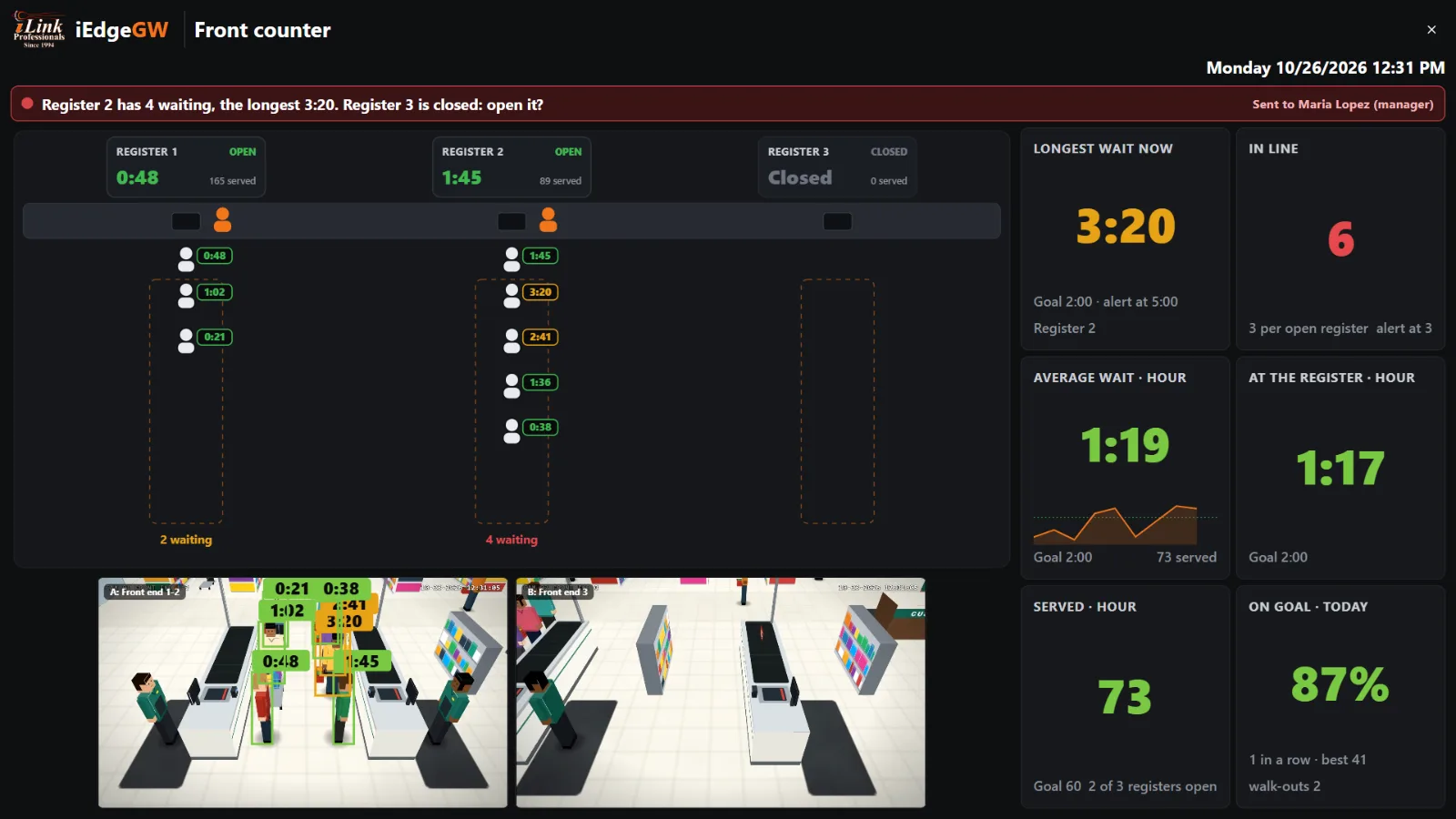
The board's own HDMI screen needs no sign-in: it shows only that board and its cameras, never sleeps, and comes back by itself after a power cut.
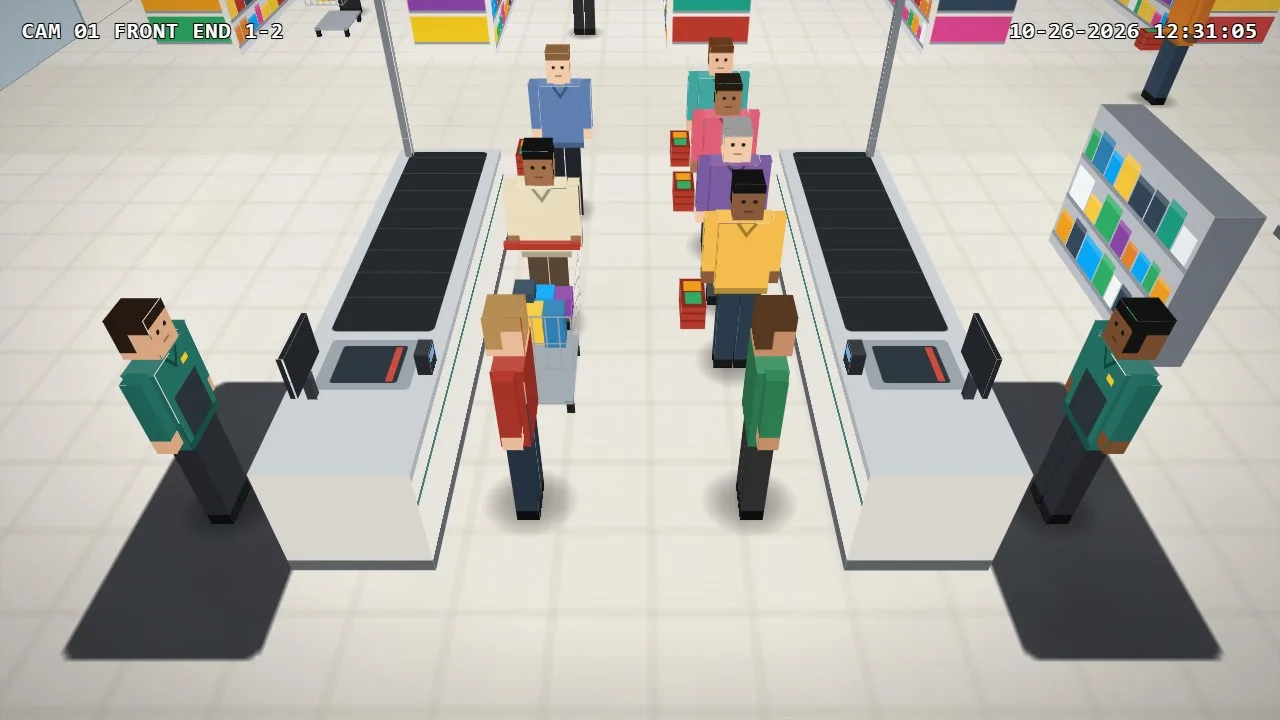 A: Front end 1-2
Each step has its own goal. Watch one customer through a restaurant counter: the wait runs until they step up to the register, then the time at the register, then the wait for their order.
From joining the line to reaching the register. The number shoppers feel.
Ordering and paying. Shown and reported, never alerted: a big order is normal.
For a restaurant: from paying to the order in hand, with its own alert.
Line, register and pickup together: the customer's whole time at your counter.
A small cashier zone is drawn behind each register. Someone standing there means the register is open; nobody, closed. That is what lets the board say "Register 3 is closed: open it?", and count each register's open hours in the reports.
Set the limits once. One message per problem, with the camera's picture and the problem in words, to the store's own people by name.
It names the busiest register and, when one is closed, says to open it.
Register 2 has 4 waiting, the longest 3:20. Register 3 is closed: open it?Any customer reaching "too long", at once.
A customer at Register 1 has waited 5:04The middle wait of the last five customers, not one slow basket.
The last 5 customers waited about 3:12Customers who left a line without being served.
2 customers left a line without being served in the last 15 minutesFor restaurants: an order waiting too long, or the last five.
An order has waited 6:10 at pickupThe message goes again every 10 minutes while the problem lasts, to the supervisor too after 15 minutes, and ends after 2 minutes back on goal. Each of these can be changed.
Every customer is kept, so the report answers: how fast were we, when were we slow, which register held us up, and how many walked out. PDF and CSV, or every day, week or month by e-mail and WhatsApp.
| Register | Open | Customers | Wait | On goal |
|---|---|---|---|---|
| Register 1 | 13 h | 498 | 1:04 | |
| Register 2 | 12.7 h | 471 | 1:21 | |
| Register 3 | 4.9 h | 239 | 1:02 | |
| Service desk | 9.5 h | 76 | 2:14 |
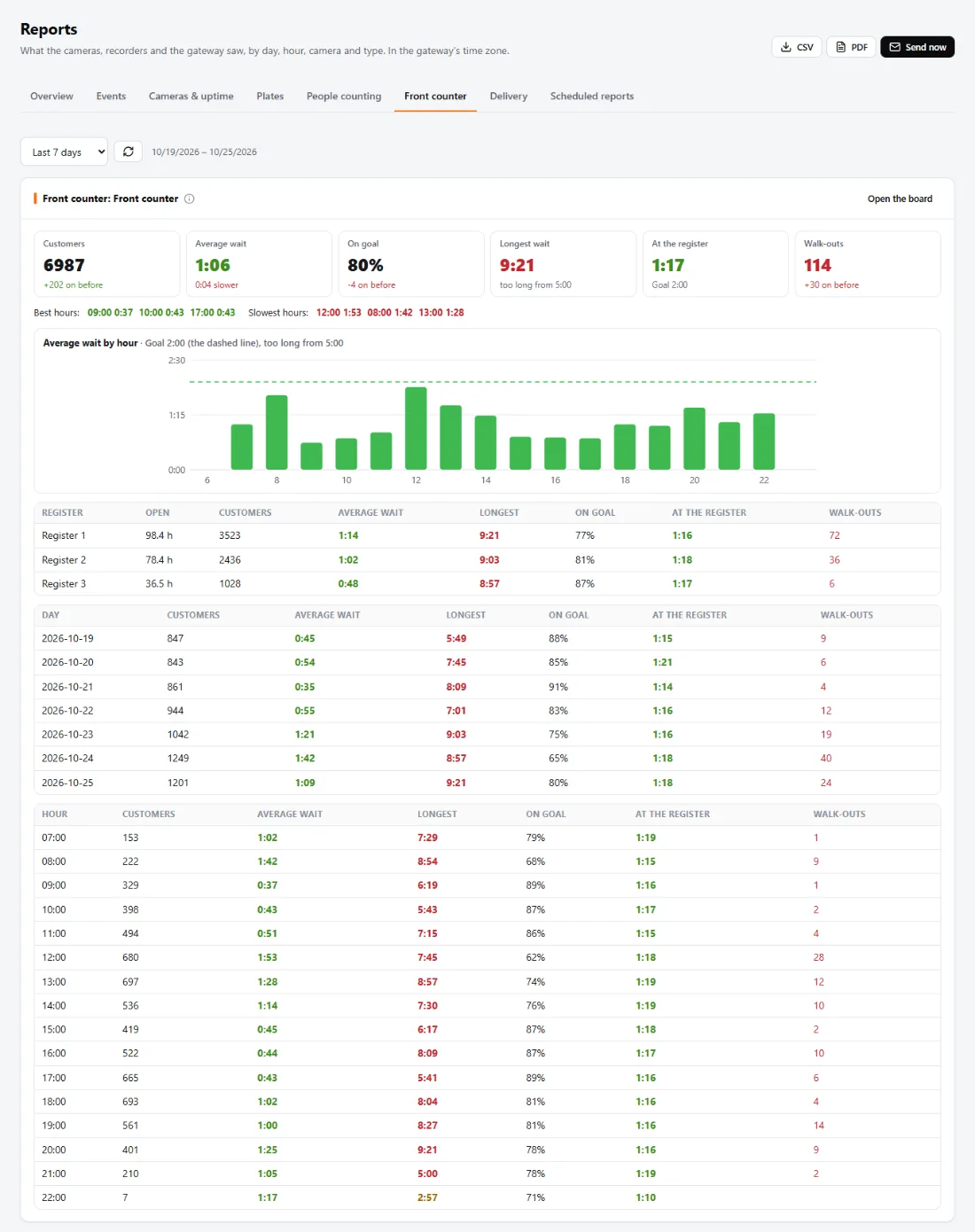
The On goal tile counts the customers served in a row within the goal, with the day's best beside it. Cashiers start chasing their own record, and the lines get shorter without anyone shouting.
What LineSense keeps
A camera already over the registers is often fine as it is. You draw each register's line, its spot at the register and its cashier's place on the camera's picture: about two minutes a register.
Line 1
At register 1
Cashier 1
Line 2
Cashier 2
Drawing the zones
For each register: its line, where people stand to wait; its spot at the register, where the customer pays; and its cashier's place. A person counts where their feet are, and the count inside shows at once, so you see straight away that every waiting person is counted.
In Insights: a Front counter board, its name and who sees it.
Restaurant counter, store checkout or convenience store: the times come ready.
Its line, its spot at the register, its cashier's place. About two minutes each.
The manager and supervisor by name, by e-mail and WhatsApp.
| In the store | One iEdge Gateway box on the camera network. It counts and times, keeps the reports, drives the TV and sends the alerts. |
|---|---|
| Cameras | Through Hikvision, Dahua, TVT and Uniview recorders, or ONVIF and RTSP cameras added directly, and many more. Up to three cameras and eight registers per board; several boards per store. |
| The camera's settings | Read, never changed. |
| Display | HDMI from the box to a TV (no sign-in, never sleeps, back by itself after a power cut), or the board in any browser. |
| Alerts out | E-mail (the gateway's own relay, or your mail provider) and WhatsApp (a linked phone), copies to FTP / SFTP or a Google Drive folder. |
| Reports out | PDF and CSV; daily, weekly and monthly by e-mail, WhatsApp, FTP or Google Drive. |
| What it keeps | Counts and times only: no faces, no names. The AI runs on the box, in the store. |
Move the sliders to your store. This is arithmetic on your own numbers, an illustration, not a promise of results.
Time the drive-thru lane and the front counter with the same iEdge Gateway: one box, one set of reports, one place for the alerts.
The gateway, the live board, the alerts and the reports, for one store. It is in stock.
Or call 215-315-3525. In stock.
A drive-thru too? Both on one gateway: $1,495. Drive-Thru SOS and LineSense together, one box, one set of reports, one place for the alerts.
Order the comboNo. LineSense times customers with the cameras you already have. A small iEdge Gateway box in the store does the timing and can drive a TV over HDMI. No ceiling sensors, no door counters, no beams across the lanes.
Cameras recorded by Hikvision, Dahua, TVT and Uniview recorders, and ONVIF or RTSP cameras added directly, and many more. It never changes the camera's settings.
Anywhere people line up at a counter: grocery and supermarket checkouts, department stores, malls and food courts, convenience stores and fuel, pharmacies, home improvement and electronics, restaurants and cafés, banks and service counters, hotels and venues. You pick the store type and it sets realistic default times.
Up to eight registers on up to three cameras per board, and one camera can watch several lines. A store with more makes a second board, for example one for the front end and one for the service desk.
A small cashier zone is drawn behind each register: someone standing there means the register is open. That is how the board can say which register is closed and should be opened.
They are one customer of the register they reach, waiting from their first line. Moving to another line is never counted as a walk-out.
No. LineSense counts and times people; it does not recognise them. It keeps no faces and no names, only how many people waited and for how long. The video stays on the gateway in the store.
By e-mail and WhatsApp, with the camera's picture and the problem in words, for example: "Register 2 has 4 waiting, the longest 3:20. Register 3 is closed: open it?" The supervisor is told too if it is still going after 15 minutes.
Customers, the average and longest wait, the share served within goal, the time at the register and walk-outs, by register, hour and day, with the best and slowest hours. Download as PDF or CSV, or receive them daily, weekly or monthly by e-mail and WhatsApp.
$995, one time, for the iEdge Gateway with the LineSense board, alerts and reports. There is no monthly fee for a single location. In many cases it uses the cameras you already have; you can also add 1 to 3 cameras with a motorized zoom lens when you order. With Drive-Thru SOS on the same gateway, both are $1,495. A cloud service for owners with several locations is planned as a separate monthly plan.
No. The counting and timing run on the iEdge Gateway in the store. Alerts and reports go out by e-mail and WhatsApp when you turn them on.
We build and support video and point-of-sale systems for stores and restaurants. LineSense is engineered and supported in the US, by the same people who answer your call.
Tell us your store, how many registers and the cameras you have. We will tell you what it takes, and show you the board on your own front end.