Fast shipping. Most items ships same or next business day


iEdge Gateway Drive-Thru Speed of Service Timer (Drive-Thru SOS) - Works with Your Cameras
1 of 5 Enlarge

iEdge Gateway Drive-Thru Speed of Service Timer (Drive-Thru SOS) - Works with Your Cameras

Product ID CPV-EdgeGW-DT
List Price: $1,495.00
Price: $995.00
LineSense times every customer in your checkout and counter lines and tells the manager which register to open. Added to this gateway it makes the Drive-Thru SOS + LineSense combo: one box, one set of reports, and $1,495 for both.
By default nothing is added: the gateway uses your existing IP cameras when they see the lane or the lines properly and it can reach them over ONVIF or RTSP, directly or through your NVR. Or add new 4K 8MP PoE turret cameras with a 2.7 to 13.5 mm motorized zoom lens: the zoom is set after mounting. A drive-thru usually takes two (the order point and the windows) and up to four; the front counter takes one to three, since one camera can watch several lines. With both products, add them up. PoE cameras need a PoE switch, a PoE port on the NVR, or an injector.

Every car. Every second. Live.

iEdge Gateway · Drive-Thru Speed of Service (Drive-Thru SOS)

Know how long every car waits at the menu board, the pay window and the pick-up window, while it is still in your lane. The iEdge Gateway times every car with your cameras and puts the whole lane on your kitchen TV, so the crew fixes the slow spot before the line backs up into the street.

Works with the cameras you haveNo ground loopsNo headset tie-inTiming runs in the storeNo monthly fee for a single locationIn stock

Why stores ask for it

Serve more cars

See the line build and act before it backs up. Every second saved at the slowest point is more cars through the window in your busiest hour.

Find the bottleneck

Menu board, pay or pick-up window: the board names the point that slows the lane down, by hour and by daypart.

Coach with facts

Every car's time at every point, with a picture of the car. Talk to the crew about real cars, not feelings.

No new lane hardware

Nothing cut into the asphalt and nothing added to the headsets. A small box in the store and your cameras do the work.

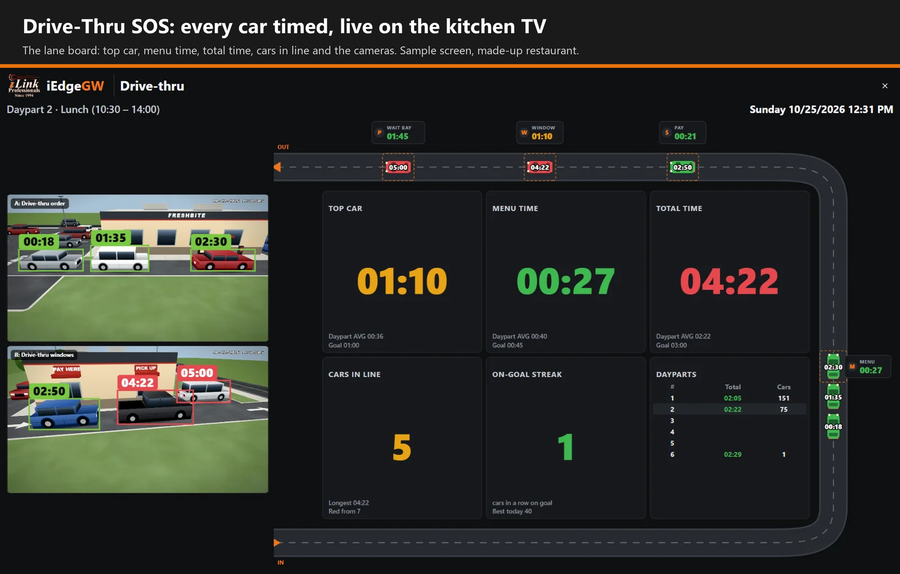
The Drive-Thru SOS lane board on a TV: top car, menu time, total time, cars in line and two cameras with each car's time over it
On the kitchen TV. The lane drawn live, the times against your goals, and the cameras with each car's time over it.
Illustration of a drive-thru with the line, menu board, pay window, pick-up window and wait bay marked as timing points
Every point, every car. Line, menu board, pay, pick-up window and wait bay, each with its own goal.

What you get

  • A live lane board: every car drawn and timed from the end of the line to the window, green while it is on goal, amber when it gets close, red when it is over.
  • Times at every point: line, menu board, pay window, pick-up window and wait bay, plus the lane total.
  • The numbers the crew needs: cars in line, cars per hour, drive-offs, pull-forwards, the bottleneck, dayparts, the on-goal streak and the store's own leaderboard.
  • Alerts by pop-up on the board, e-mail and WhatsApp: a car held too long, the line growing, the lane slowing down, a car that drove off.
  • A car log with a picture of every car at each stop and a clip that starts 10 seconds before it got there. Pictures are kept for 14 days.
  • Reports by hour, daypart and day, as PDF and CSV, or sent to you every day, week or month.
  • HDMI straight to the kitchen TV, or the board in any browser on the store network.
  • Every lane shape: single lane, one window, tandem menu boards, side-by-side order lanes that merge, and dual lanes.

Cameras: use yours, or add ours

Use the cameras you already have

  • In many cases your own cameras do the job, when they are positioned properly and the gateway can reach them: directly over ONVIF or RTSP, or by RTSP through your NVR.
  • Works with Hikvision, Dahua, TVT and Uniview recorders, ONVIF and RTSP cameras, and many more.
  • It only reads the camera's second stream. Nothing on the camera or the recorder is changed.
  • Not sure? Send us a snapshot from each lane camera through our contact form and we will tell you before you order.

Or add cameras chosen for the lane

  • No camera on the lane, or it looks the wrong way? Pick how many in the Cameras choice above and they ship with the gateway. Leave it on "Use my existing compatible IP cameras" and nothing is added.
  • They are 4K 8MP PoE turret cameras with a 2.7 to 13.5 mm motorized zoom lens. The zoom is set after the camera is mounted, so the stopped car fills the right share of the picture wherever the camera has to go. They need a PoE switch, a PoE port on your NVR, or a PoE injector.
  • Most drive-thrus use two: one at the order point and one at the windows.
  • One camera can cover more than one point when it sees them at a good angle. Bigger layouts, such as two lanes or a wait bay around the corner, can take three or four.

For installers and IT

In the storeOne iEdge Gateway box on the camera network. It does the timing, keeps the reports and drives the TV.
CamerasThrough Hikvision, Dahua, TVT and Uniview recorders, or ONVIF and RTSP cameras added directly, and many more. Up to three live cameras on the board.
Video it readsThe camera's second (sub) stream, H.264, 704x480 or 1280x720 (not 352x288), 10 to 15 frames a second.
Where a camera goesOn the building, on the menu board and window side, past each stop, aimed back down the lane: 8 to 10 ft high, 13 to 26 ft from the stopped car, tilted 15 to 30 degrees. The stopped car should fill about a third of the picture's width.
Set-upIn a browser: pick the lane template, pick the cameras, click four corners on the ground for each point, set the goals. "Check the cameras" grades each camera from its last 24 hours.
DisplayHDMI from the box to the kitchen TV (TV mode), or the board in any browser.
What it detectsVehicles only. A car must be seen three times and stand 0.4 s in a zone; a stop counts after 2 s. Glare, rain, night and camera shake are handled.
PrivacyThe timing runs on the gateway in the store. Video is not sent to a cloud service to be timed.

What you need

  • This iEdge Gateway with the Drive-Thru Speed of Service board (this product).
  • Cameras on the lane: your own, or the ones you add above.
  • A TV or monitor with an HDMI input for the kitchen, and a network connection to the cameras or the recorder.

One price, no monthly fee

  • One-time purchase. For a single location there is no monthly fee: the timing, the board, the alerts and the reports all run on the gateway in your store.
  • A front counter too? Add LineSense on the same gateway with the choice above: the two together are $1,495.
  • Several locations? A cloud service that brings all your stores together is planned as a separate monthly plan. Ask us about it.

Want to see the board on your own lane first? Ask for a demo through our contact form, or call 215-315-3525.

The restaurant, cars and times in the pictures are made up ("FreshBite" is not a real brand).

Price: $995.00
« Previous | Next »
Product Reviews
No Reviews For This Product.